Experience effortless setup with our device featuring 4G/5G connectivity with the included eSIM.
Experience the easiest and fastest device installation ever! Say goodbye to involving your IT team. With our device, you can effortlessly set it up in just three simple steps, making it a hassle-free solution for everyone.
Place
Select the scenario you wish to implement. Prepare the power source and position the device appropriately.
Connect
Upon powering on the device, it seamlessly connects to the internet and the cloud using its advanced 4G/5G eSIM, ensuring you dive straight into the game without any delays. Experience the thrill as the game reaches its exciting conclusion!
Analyse
The device will send the gathered information to our Cloud. Now relax and analyse the data to improve your business.
Installation tips to ensure the best data quality
The highest accuracy of data (99.8%) can be reached only if the AI Visitors Kit is placed correctly. Please follow these recommendations during installation
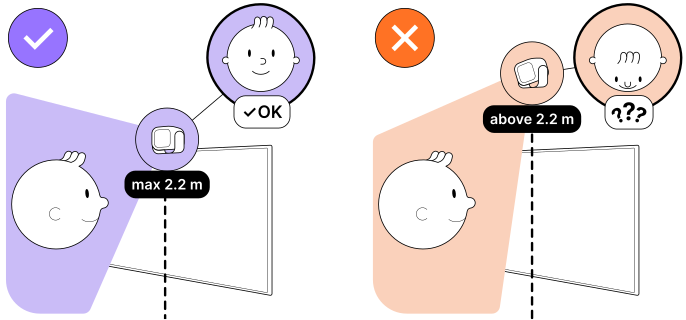
1. Max placement height - 2.2 m (7 ft)
Our software works with faces, so it is crucial for a sensor to see visitors' faces properly.
Try to place a sensor at a height so that it can see faces.
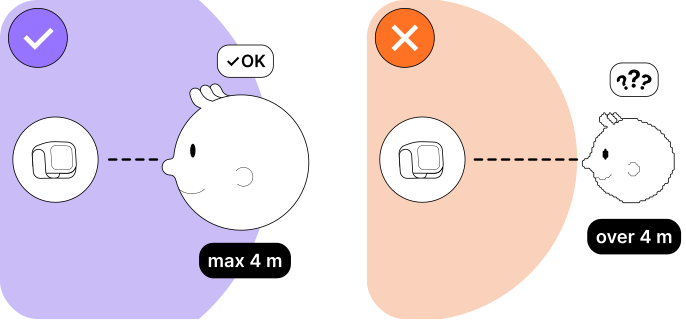
2. Max distance to face - 4 m (13 ft)
Our software works with faces, so it is crucial for a sensor to see visitors' faces properly.
Try to place a sensor not too far from faces.
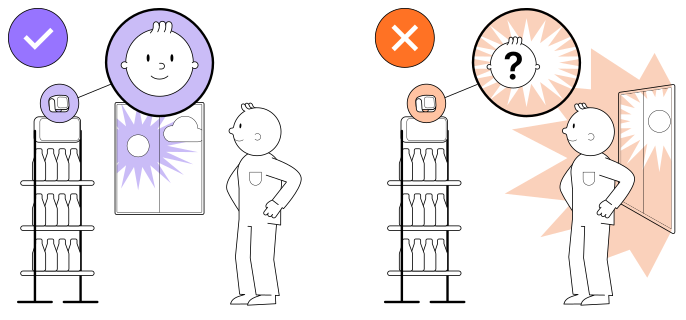
3. No direct bright light
Don’t place a sensor in front of a window or other sources of bright light to avoid glare.
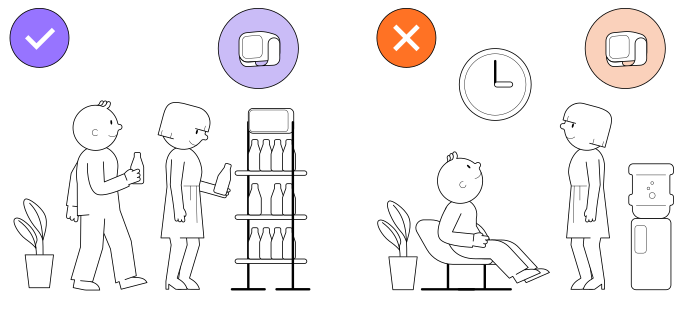
4. Walk-through place
Place a sensor in an area where people are walking by, not in waiting areas, as it can lead to misleading data. In places where people spend a lot of time (such as offices or waiting zones), the sensor may detect the same people multiple times. Try to place the sensor so that it looks at people's faces directly, and not from the side
Finally to the Audience Analytics
After your AI VIsitors Kit is connected to your platform and installed correctly, you can start collecting Audience Analytics.