Installazione semplicissima con il nostro dispositivo dotato di connettività 4G/5G con eSIM inclusa.
Prova l'installazione del dispositivo più semplice e veloce di sempre! Di' addio al coinvolgimento del tuo team IT. Con il nostro dispositivo, puoi configurarlo senza sforzo in soli tre semplici passaggi, rendendolo una soluzione senza problemi per tutti.
Posiziona
Seleziona lo scenario che desideri implementare. Prepara l'alimentazione e posiziona il dispositivo in modo corretto.
Connetti
Una volta acceso, il dispositivo si connette senza problemi a Internet e al cloud utilizzando la sua eSIM 4G/5G avanzata, assicurandoti che tutto funzioni senza ritardi. Vivi l'emozione mentre il gioco raggiunge la sua emozionante conclusione!
Analizza
Il dispositivo invierà le informazioni raccolte al nostro Cloud. Ora rilassati e analizza i dati per far crescere il tuo business.
Installation tips to ensure the best data quality
The highest accuracy of data (99.8%) can be reached only if the AI Visitors Kit is placed correctly. Please follow these recommendations during installation
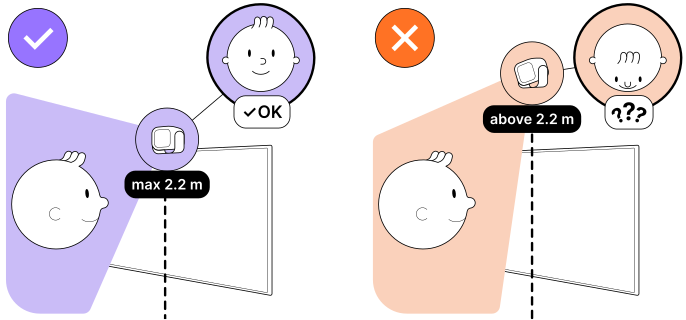
1. Max placement height - 2.2 m (7 ft)
Our software works with faces, so it is crucial for a sensor to see visitors' faces properly.
Try to place a sensor at a height so that it can see faces.
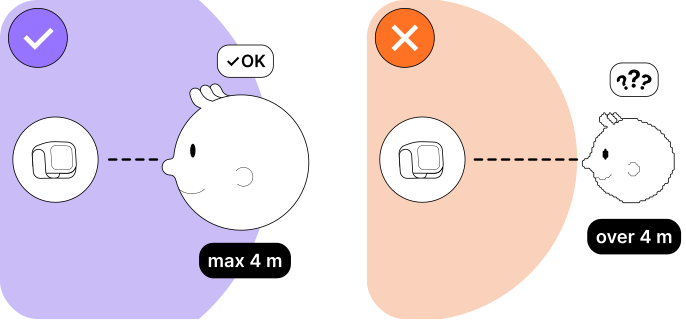
2. Max distance to face - 4 m (13 ft)
Our software works with faces, so it is crucial for a sensor to see visitors' faces properly.
Try to place a sensor not too far from faces.
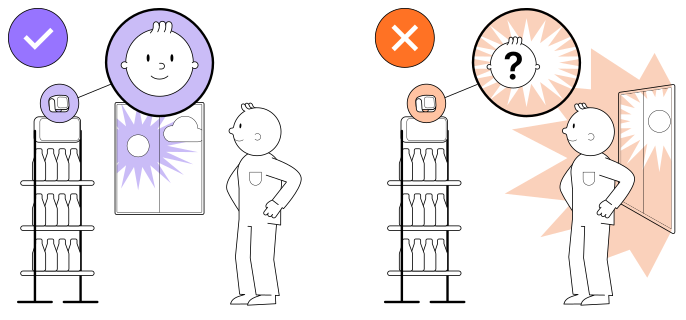
3. No direct bright light
Don’t place a sensor in front of a window or other sources of bright light to avoid glare.
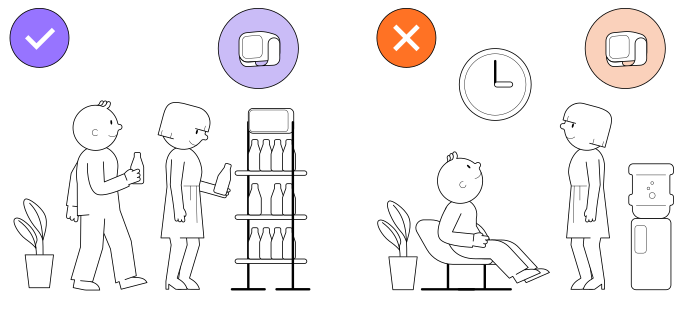
4. Walk-through place
Place a sensor in an area where people are walking by, not in waiting areas, as it can lead to misleading data. In places where people spend a lot of time (such as offices or waiting zones), the sensor may detect the same people multiple times. Try to place the sensor so that it looks at people's faces directly, and not from the side
Finally to the Audience Analytics

After your AI VIsitors Kit is connected to your platform and installed correctly, you can start collecting Audience Analytics.